Cost Types

Antonella
Written by AntonellaLast updated 1 year ago

Cost types define the type of cost incurred which are then charged to the various projects.

Prior to creating cost types cost groups need to be created.

How to create cost groups.

Cost types are located within Project > Other setup > Cost Type.
project+g.png?expires=1782000000&signature=763218353d0b6577912c7f9a240ad1311498536deaa8659786567dfcec4a9f2e&req=cCgjEsl5noRWFb4V1XW4gQXrtKDREDIt3dVqkmdywawrECCmFh0uF1ND31vG%0AfQov8g73B48dTdn1R7cH2ppxdQ%3D%3D%0A
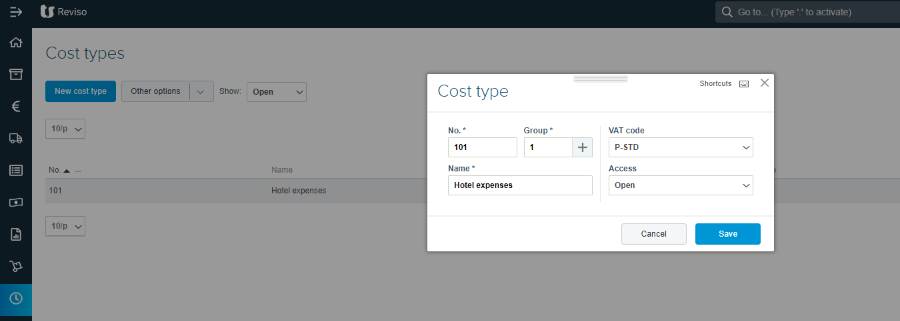
  • No. - enter a cost type number

  • Group - select a cost group that defines the cost type

  • VAT code - enter the default vat code applicable, this can be changed at the point of entering the expenses.

  • Access - open, can be used, Barred, cannot be used.

Did this article help you solve your issue?

Reviso Guide

© 2026 Reviso Guide. All rights reserved.

Knowledge Base Software by Customerly