Choose the number series when creating recurring invoices

Antonella
Written by AntonellaLast updated 1 year ago

When many invoices are issued using the subscription add-on module, you may want to classify the invoices with a different number series to your other sales invoices.

You can create a new number series within Configuration > Number series.

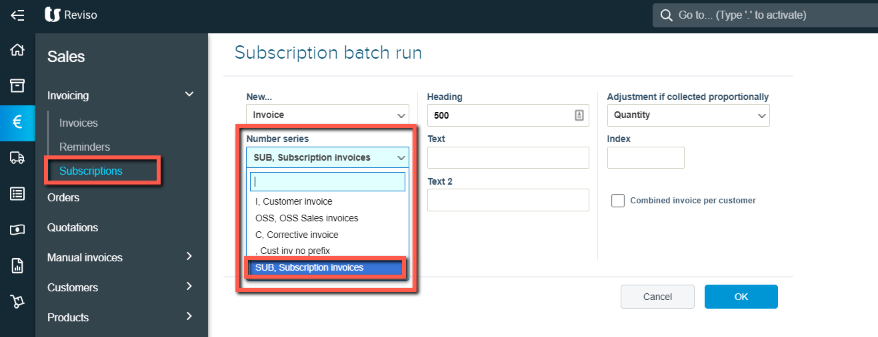
Once created, you can run your subscriptions and select the number series from the dropdown and this will then prefix all subscription invoices raised.
sub+inv.png?expires=1782000000&signature=200baa37ca2452061029db1c2adf062819e77ff5c5f2363eb276a84612ba7d09&req=cCImFsp8lYReFb4V1XW4gXgctuSdeeizeQrOCpMNJx1Ro7R8X2sx%2F7Rct2EE%0A%2BsLjaT68mI7niYp9oKbxuo%2BTeg%3D%3D%0A

Did this article help you solve your issue?

Reviso Guide

© 2026 Reviso Guide. All rights reserved.

Knowledge Base Software by Customerly