Show the VAT registration number of my client on the invoice

Fabio Mirone
Written by Fabio MironeLast updated 4 years ago

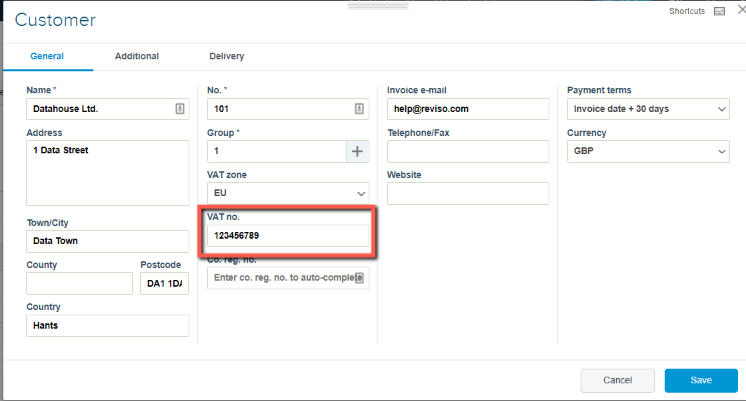
When you create a customer there is a VAT registration box. This is not a mandatory field however, should either you or your customer require their vat registration to be present on the invoice it need to be entered here as it cannot be entered when creating the sales invoice it needs to present in the customers details.

The invoice layouts within the system has a dynamic field which allows the vat registration to be shown if present in the customer setup.
vat+reg.png?expires=1782000000&signature=027ea86ea6a1d85812287575aa3a5f09dfd151b045c3afc180bd3a14e3f99688&req=cCImEsl4n4FYFb4V1XW4gdyb8j7TGFHB9q1OoNy%2Bnf8adtxuyx853MSdOF6z%0AK3e5%2ByMIm4L3NM4w1hI9WXPQOg%3D%3D%0A

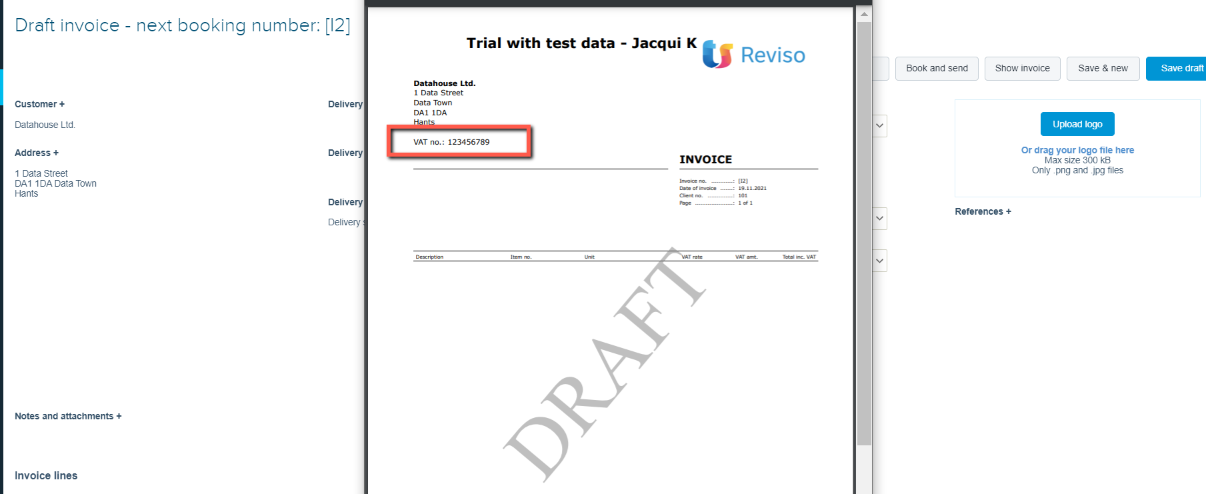
Once entered save your customer details, create the invoice for the customer and then select to Show invoice their vat registration will be displayed.
vat+reg+2.png?expires=1782000000&signature=6188b1c1f01c3cb67cb53aea49327accc48b4c33a972881273d0a99f3632d6f7&req=cCImEsl4nIdaFb4V1XW4gT8CuNYAEU7uSoJLqBTR0Fmz72jmB9IYoWlorg0i%0AOT4RpG%2FewhYG26joTgnT3Z0Fng%3D%3D%0A

Did this article help you solve your issue?

Reviso Guide

© 2026 Reviso Guide. All rights reserved.

Knowledge Base Software by Customerly