Convert an Order into an Invoice

Antonella
Written by AntonellaLast updated 1 year ago

To convert a single order into an Invoice, go to -> Sales -> Sales Orders.

Select a previously completed order in "Edit" or create a new one and then click on the "Convert to invoice" button.
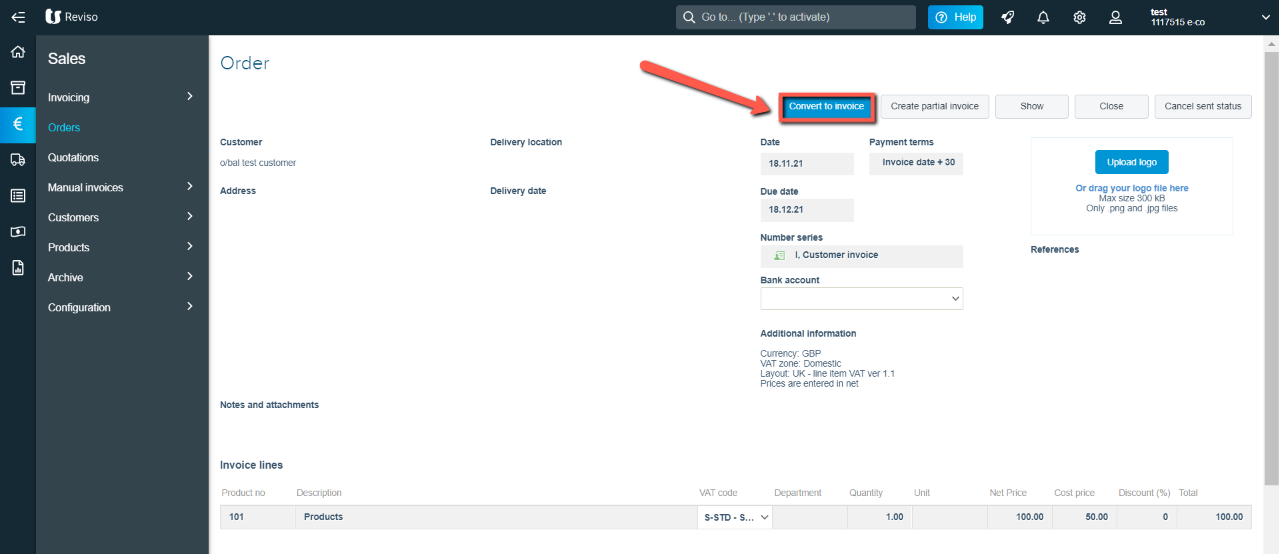
conv+inv.png?expires=1782000000&signature=848445565fe964fdc926c1aea172769d955e71ac70fe739dfdba2585ae3af788&req=cCInH8l2nIVcFb4V1XW4gXWOmtwle4ZxMWek9Vl4rrAC1M2FnO2eWv9nYmSk%0AuNj9c1qWfsb6IiHj5tvS7SLgBw%3D%3D%0A

The order will then appear within Current invoices all the information originally entered will be transferred over however, if you need to add any further products or services prior to booking and emailing out to your customer you can.

Did this article help you solve your issue?

Reviso Guide

© 2026 Reviso Guide. All rights reserved.

Knowledge Base Software by Customerly