The sales contacts

Antonella
Written by AntonellaLast updated 1 year ago

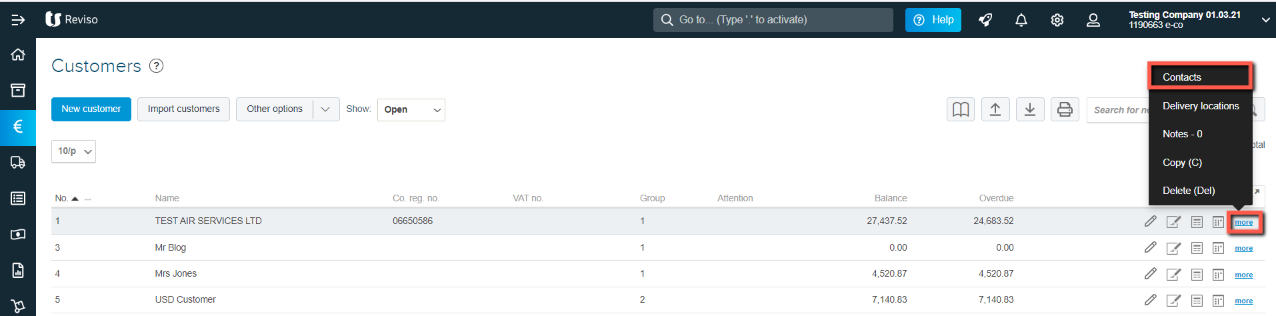
Contact management can be accessed from Customers -> then from the list of customers. Locate your customer and go to the toolbar to the right, for the selected customer click on Other > Contacts.

This option allows invoices, reminders etc to be sent to one or more persons.
contacts+17.11.png?expires=1782000000&signature=5753958df3c57f626edc22d52c35f4762bd322457c288beb734b75bdde0a82b6&req=cCInFMp%2FlIdcFb4V1XW4gVH52vdPlJ8vPRG0CvKEde%2FpiITT3zDxXWKn2RAT%0Av4Zp1%2FNvNXjsMmiT0e237%2Fbxgw%3D%3D%0A

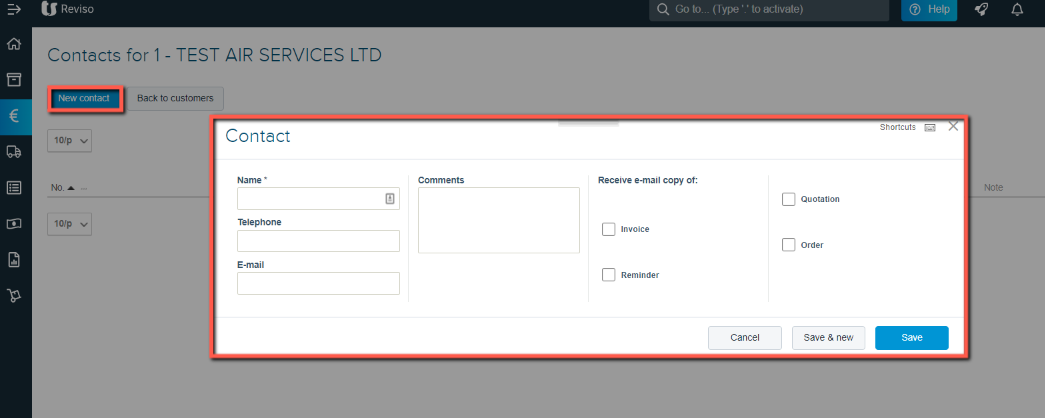
From here you can view, edit and create the data of the new contacts of each customer.
cont+17.11.png?expires=1782000000&signature=1983109c34a1efd0fac175aeb91638f59f658e68baf7b6e25eba62c6b0e09280&req=cCInFMp9nYhcFb4V1XW4gXUF6cfSiXHICw52P7ar9Idr9jlWPARhHaesouNf%0AWU02yL8p7j4UUj5YBUwnEt3Pwg%3D%3D%0A
  • Click on New contact

  • Enter the contacts full name

  • Contact number

  • Email address

  • Select the documents they require

  • Save

Did this article help you solve your issue?

Reviso Guide

© 2026 Reviso Guide. All rights reserved.

Knowledge Base Software by Customerly