Delivery locations

Antonella
Written by AntonellaLast updated 1 year ago

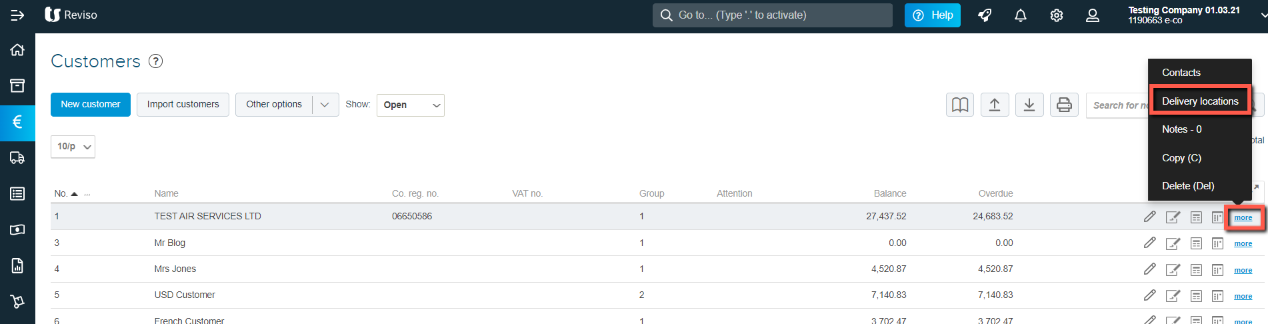
A new delivery location can be created by -> Customers then from the customer list, in the toolbar to the right of the selected customer click on Other > Delivery locations.

From here you can view, modify and create the data of the places of delivery.
del+locations17.11.png?expires=1782000000&signature=3ddead13f14c24b8ebd84af5a19a5fc718a1e13f97c21ce7569c942193ff430a&req=cCInFMp4mYFbFb4V1XW4gfLOfzzKlfw0rnXazIVa5bVFZ%2BdvROnxNWhAg0Ns%0AGZkXHzbBwahSxBzyldE%2FG0WWOg%3D%3D%0A

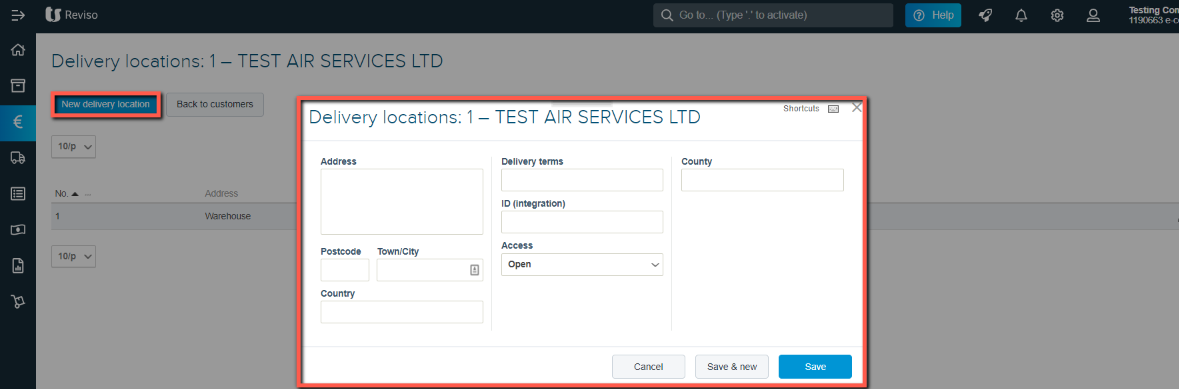
From here you can view, modify and create the data of the places of delivery.
del+17.11.png?expires=1782000000&signature=557aa26c6ac3799f16cb568a360e5e3f10cd6852025ecf91a29411ba2b35ebde&req=cCInFMp2nIFYFb4V1XW4gW2AQHX2PtwcLU2n2V9xOeqa9%2FjS%2BdT1qgtcFXHB%0A%2FcJYNI6UDmsdS0hzMAj7PzSnUQ%3D%3D%0A
  • Click on new delivery location

  • Complete the address details

  • Delivery terms

  • ID Integration (electronic invoice office code not currently applicable in the UK)

  • Access - leave as Open or, you can select to have the location barred at a later date.

Did this article help you solve your issue?

Reviso Guide

© 2026 Reviso Guide. All rights reserved.

Knowledge Base Software by Customerly