The sales lists

Fabio Mirone
Written by Fabio MironeLast updated 1 year ago

The sales price list

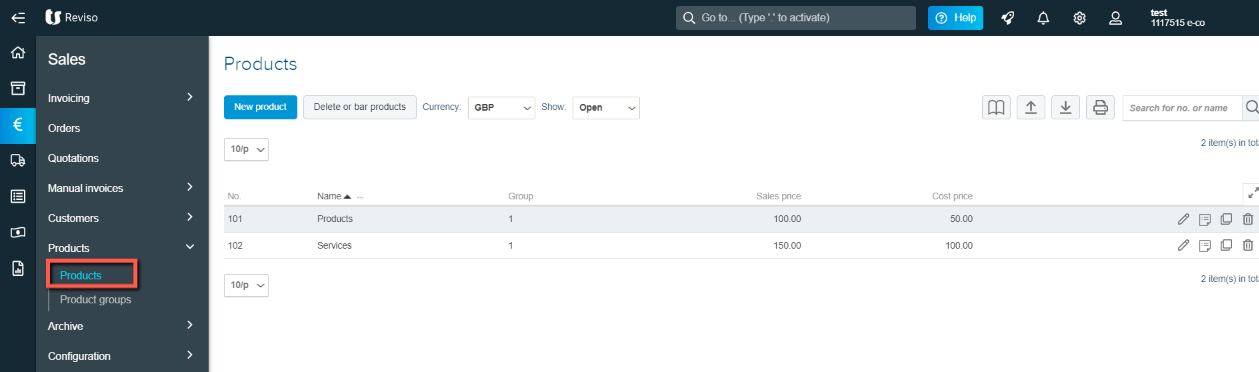
By accessing the Sales area and then from > Products > Product lists it is possible to define the sales lists that you want to use in the sales documents (estimates, orders and invoices).
prod+18.11.png?expires=1782000000&signature=d5c0af9fb33828e5665aa4762087df810f9455cf244bf4118488ce420f38783a&req=cCInHsx%2FlYZYFb4V1XW4gfajLTTrnYOcuMcyw3mT%2BAfAYibCq43GmImOUwK9%0AW%2BN6gHWoe5bS6VghO404T4iFnA%3D%3D%0A

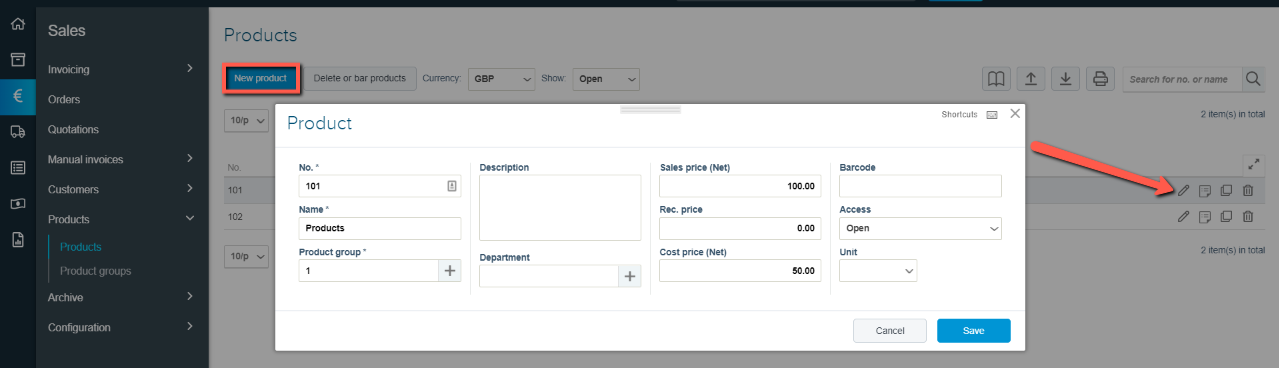
You can create your own product list by selecting New product here you can enter the product name, description, the default selling price which can be changed when creating your sales invoice. The type of units you well by and you can enter a cost price for reporting.

You can also edit the product and prices at any stage by clicking on the edit icon far right.
prod+l+18.11.png?expires=1782000000&signature=83229914ba93391e7cadbd4bc59c178a88b644ea7cdc854581248919a965ca18&req=cCInHsx9moRZFb4V1XW4gZv%2Bs5Qi1CH6Su3KlnKDIXXL3AnGaMahXZ2Mdcg7%0AOWq%2FYq6lTqMt5L1vkCb0RuGI6A%3D%3D%0A

Did this article help you solve your issue?

Reviso Guide

© 2026 Reviso Guide. All rights reserved.

Knowledge Base Software by Customerly