Project card report

Antonella
Written by AntonellaLast updated 4 years ago

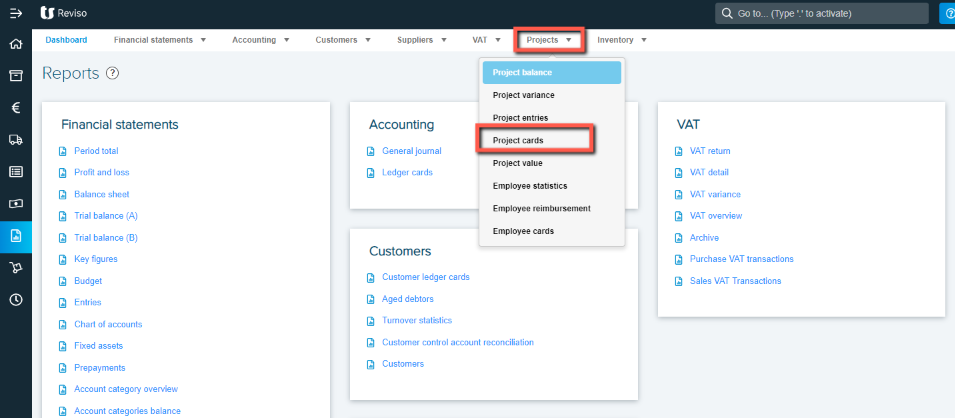
The Project card report can be ran from Reports > Project > Project cards:
proj+v.png?expires=1782000000&signature=5eff7cc41888edfd45f7e8c18d69e52363163d47053f4ad868724cda852368f5&req=cCggEst%2FmINcFb4V1XW4gckjI%2BdWI2oBewpHcFuFuwWezG%2BYOo0kDOxSf2SI%0An7d6nLlZzAMrvG2Tt%2FQuOpmSjw%3D%3D%0A

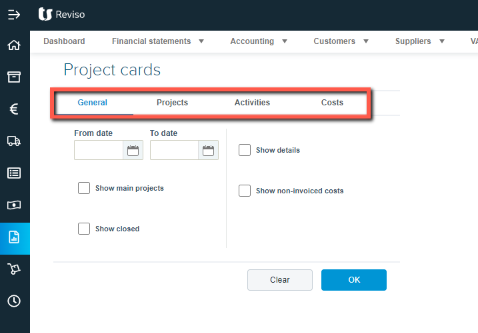
Here, you can run and view all or by individual projects, selecting activities, costs etc.
proj+x.png?expires=1782000000&signature=25e795dec8c2f85ddb2da117b9f04c7e2562d6bdf468cc77c5917e139eb52b25&req=cCggEst9lIJcFb4V1XW4gbNENon3XKp61S2cs2Yoa%2BHy5f2PHA%2FxDBifbId6%0AMwavvDf47tS7PfAC3%2FlZ19n99Q%3D%3D%0A

The individual project cards can also be viewed via projects > click on the far right icon Project card:

proj+y.png?expires=1782000000&signature=a37f7e0b1b414d6b513fa2a11b66c034cec75dbd124c0e7a656e4060ad45780e&req=cCggEst6mIVeFb4V1XW4ga8wW76gStToyd%2Figrwh%2FhOT9D8M57WN5PY3LJeA%0AJk1pA1kCtTE0%2BJqIELoAO6ZbxA%3D%3D%0A

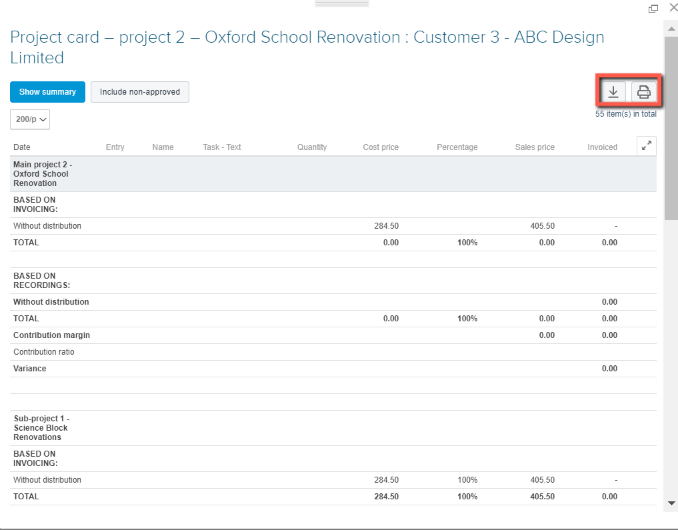
The report from both areas can be printed or exported to excel.
proj+z.png?expires=1782000000&signature=85e5c9619e1cfb872ce049e345350807323b3924ec76befb9f488e0fc9df2345&req=cCggEst7lYNXFb4V1XW4gfb0XHsW%2BR3er6J2YOylkpSrjTYARsaW0T%2F8CY5g%0AWkRZOVhXg%2BZ8eKJYTBkcwtYNJA%3D%3D%0A

Did this article help you solve your issue?

Reviso Guide

© 2026 Reviso Guide. All rights reserved.

Knowledge Base Software by Customerly