The Employee card

Antonella
Written by AntonellaLast updated 4 years ago

This report can be accessed via Reports > Projects > Employees > Employee cards. Here you can run individual or several employees within one report.
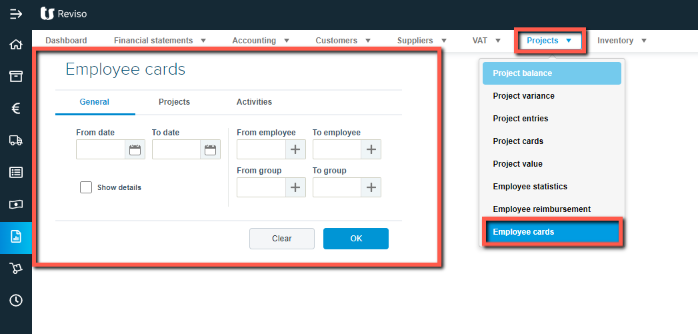
proj+dd.png?expires=1782000000&signature=943311eacacbac4d5a3b865aaf6fc5fa12921bd4f90e9bd9e3201f4d77a16e6d&req=cCgvFsh%2BnYVYFb4V1XW4gV%2FWedagINnal%2BkEmBcQ5Y3blG%2FUWzAIticd%2B6%2Bu%0Al7%2FBYtVfIMHlKo08gcRaHSnMzQ%3D%3D%0A

The same report can be accessed via Project > Employees > click on the More option to the far right of each employee:
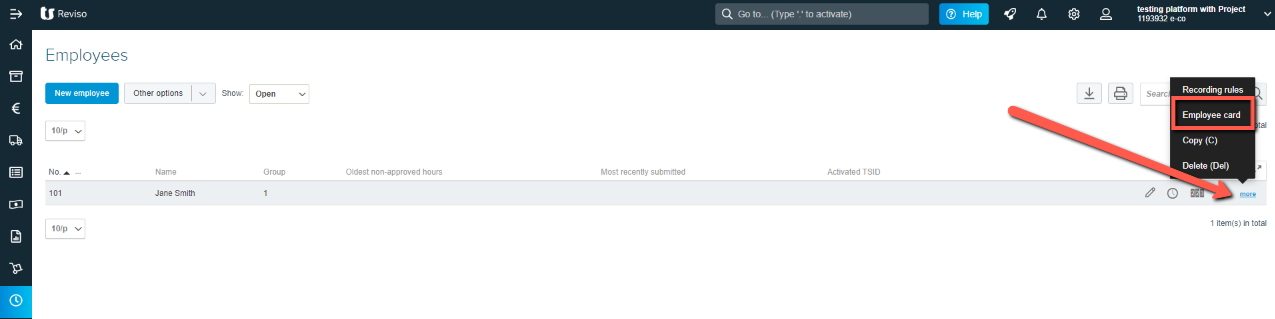
proj+ee.png?expires=1782000000&signature=578f2ca38b87aef7b8258a4ec7667f95dcdf0b46a5e864d85e11b201c7d1e48b&req=cCgvFsl3nodbFb4V1XW4gYGoOP192OB11HOtPh%2FsNbQJLfY5YY2mwb5IOga0%0AFyzRrRoPwGA1jGt5q4bPZTDGnw%3D%3D%0A

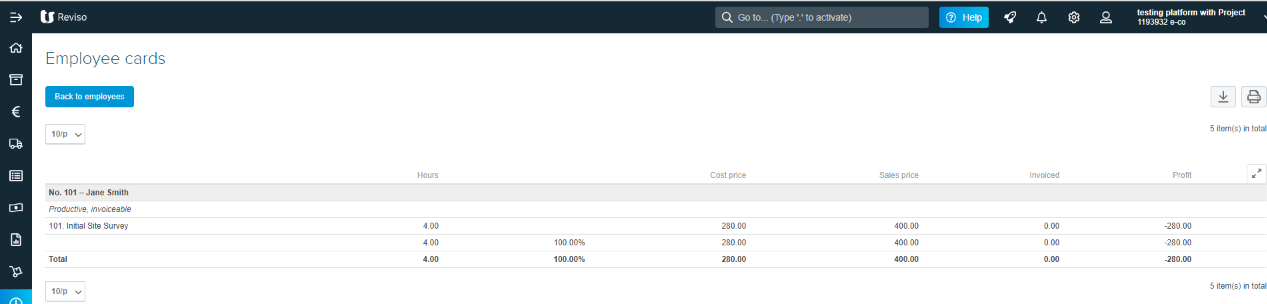
The employee card will only show approved employee entries:-
employee+card.png?expires=1782000000&signature=1287454df1d3510fe4506ee7cc6395c2b7fd31ccabb4a97842376e6fba764b31&req=cCgvFsh%2BlIBZFb4V1XW4gVm7pRg5pZvybD%2BCLbc2P5uVj9VxFgcaZ63p8t6g%0ARJjl1lohbe0iRqI%2BY6jfGj21zg%3D%3D%0A
  • Hours worked against each project

  • Cost price for the hours worked associated with the selected employee

  • Sale price for the hours worked associated with the selected employee

  • Invoiced - the amount invoiced out against the project

  • Profit - the amount of profit made.

Did this article help you solve your issue?

Reviso Guide

© 2026 Reviso Guide. All rights reserved.

Knowledge Base Software by Customerly