Within Project > other options > Project setup > you can enter a default set of parameters for when new projects are created:
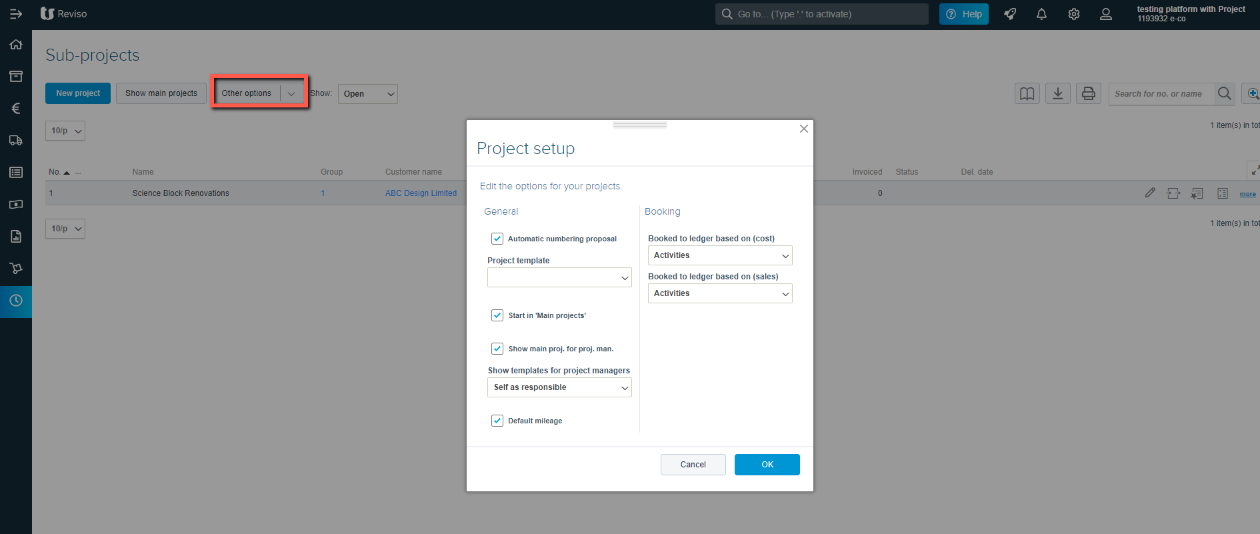
Automatic numbering proposal, each project has a number and this will allow consecutive numbering.
Project template, allows you to select a pre-defined project model within the menu options > Projects -> Project templates. Creating project templates is a useful tool if you have a lot of projects and can be left blank if you haven't created any.
Start in Main projects, this allows you to open the menu of the main projects and not of the sub-projects. To view the sub-projects, click on the relative button Show sub-projects.
Show all main projects, also if checked this box allows you to view all main projects for project managers.
Default mileage, allows mileage to be charge to a project.
Book to ledger based on (costs), the charge to the accounts will be based on either Activities or Project nominal codes.
Book to ledger based on (sales), the charge to the accounts will be based on either Activities or Project nominal codes.