Create an Employee group

Antonella
Written by AntonellaLast updated 1 year ago

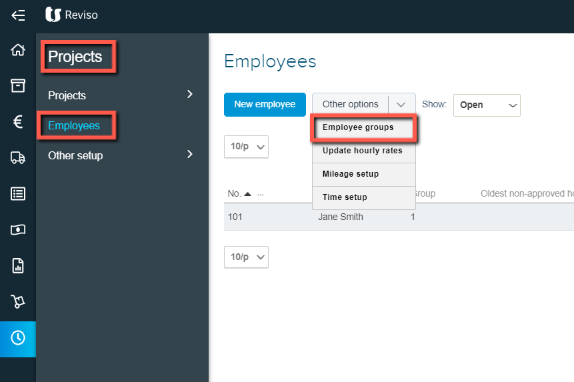
Prior to adding employees, employee groups need to created. The purpose of this is so your time recordings can be reported on based on each group, for example company employees, sub-contractors etc. Go to Projects> Employees> Other options> Employee groups.
eplo.png?expires=1782000000&signature=310d37c7d87635c10b087dde33d0ec545a42eda94d0ddfb6758b919657e3d4a9&req=cCgmFc94noFeFb4V1XW4gUEGEJTT5GlAvXd%2BEBsiUdWLff%2BQaXzFPwlUxU4W%0A5vUTrz85q%2BqBClhWU1enESScgg%3D%3D%0A

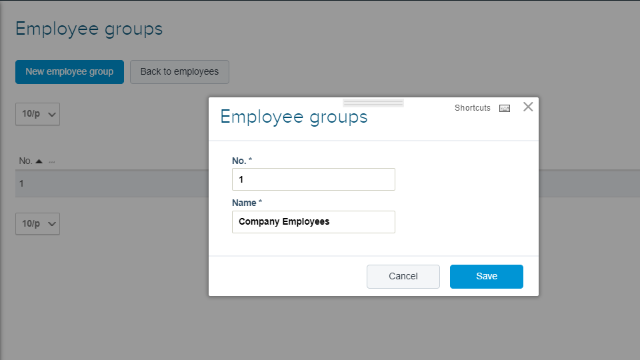
Enter a number and then a Name for your employee group.
emp+2.png?expires=1782000000&signature=9266fa82b5e8299075b053a9bbc2c084768518ab61263c9ddbadfeef23ba3576&req=cCgmFc92lYdZFb4V1XW4gUQinLiDPHnZKHp74Y12oiiICcEnS99bNrqNcgRF%0A771d0jFagBeqTApnVSeJ934hJA%3D%3D%0A

When you then create your employees they can be linked to a group and reports can be generated based on the groups created.

Did this article help you solve your issue?

Reviso Guide

© 2026 Reviso Guide. All rights reserved.

Knowledge Base Software by Customerly